
Take back control of your queues.
More time for your patients.
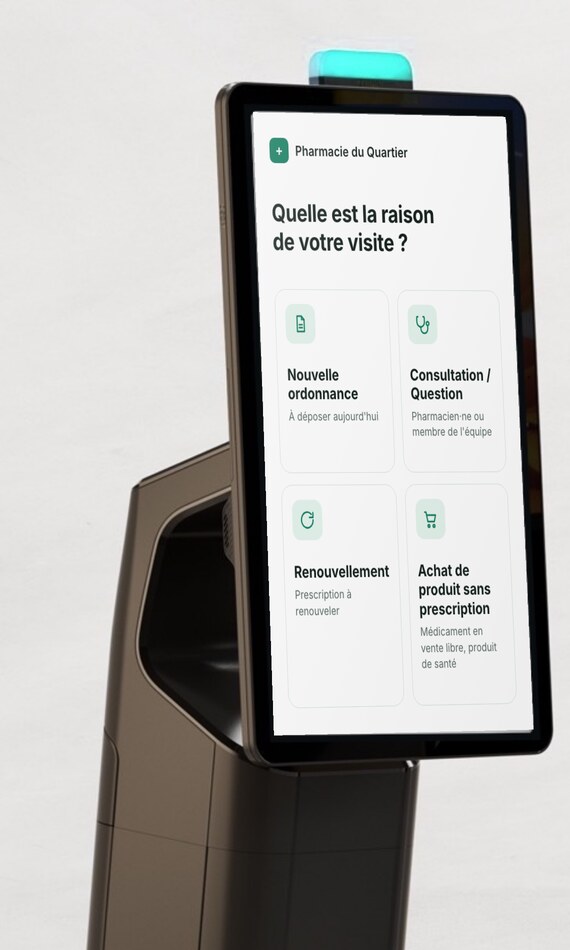
The Mobilus Kiosk greets patients as they arrive, hands them a number and puts every visit in the right queue. Your team sees who is waiting, for what and for how long, and calls the next patient when it is ready.
A calmer counter. A team that sets the pace.
What the Mobilus Kiosk changes at the counter, for the pharmacist-owner and for the lab team.
Your patients are taken care of right away
Patients follow their estimated wait on their phone and are called by their number. While they wait, they can fill in your pharmacy's questionnaire (health, insurance…): your team has the information in hand before calling them.
Pickups no longer wait behind consultations and vaccinations
Every visit enters the right queue on arrival. A quick pickup is no longer stuck behind a consultation, and the consultation goes to the right team member.
Your team sees who is waiting, for what and for how long
The dashboard shows the queue by service and each patient's time. Anyone who has waited too long stands out right away: no patient is forgotten in the waiting room anymore.
A calmer, more discreet waiting room
The number is shown on screen and announced by voice, never the name or the reason for the visit. Designed for Loi 25.
A consistent welcome, even when the team changes
The kiosk greets every patient the same way and sends them to the right queue, to better standardize your processes.
Less time lost at peak hours, with the same team
The team pulls the next patient when it is ready, instead of being pushed by whoever walks up to the counter. The lab sets the pace, not the line.
See the Mobilus Kiosk in action.
What the patient and the team see, from arrival at the pharmacy to the counter call.
The patient journey, from the kiosk to the counter call
Check-in at the kiosk, printed ticket, wait tracked on the phone, then the number called on the waiting-room screen.
How it works
From arrival to the counter call, in six steps.
- 01Kiosk
The patient picks the reason for the visit
Pickup, new prescription, refill, appointment, consultation: a few taps. The RAMQ card means no typing a name; it is never displayed or stored.
- 02Kiosk
A ticket prints
Number, service, time and estimated wait, with a QR code to follow the queue. Always printed, for patients without a phone.
- 03Patient's phone
The patient follows the queue on the Allo Rx page
The QR code opens the Allo Rx page: no app, no account. Live estimated wait and the pharmacy's short questionnaire.
- 04Lab
The lab sees the queue
Queue by service, each patient's wait time, assignment to a team member and the questionnaire answers.
- 05Lab
The team calls the number to a counter
When ready, the team calls the patient to a free counter. Their phone shows "It's your turn!" and the counter.
- 06Waiting room
The waiting room shows the number and the counter
Number and counter on screen, chime and voice announcement. Never the name, never the reason for the visit.
Four screens, one journey.
Each person sees exactly what they need.
The kiosk
The patient, at the lab entrance
Welcome in your pharmacy's name, reason for visit, RAMQ card reading, printed ticket. Large text, audio read-out, French and English, a help button that alerts the team.
The Allo Rx patient page
The patient, on their phone
Number, live estimated wait, "It's your turn!" with the counter, the pharmacy's questionnaire, a notification on the phone if the patient turns it on.
The lab dashboard
Your team, on the lab computers
Queue by service, wait times and thresholds, assignment, call to a counter, patient card and answers, the day's indicators, help requests from the kiosk.
The waiting-room screen
The patient in the room
Number and counter, chime and voice announcement. Never a name, never a reason for the visit.
What's included
Three components, supplied by Mobilus and monitored remotely.
The check-in kiosk
Everything needed to welcome the patient, in a single pedestal.
- 22-inch touchscreenon a floor pedestal, locked to the application
- Ticket printerthermal, built into the pedestal, with automatic cutting
- RAMQ card readerreads the barcode so the patient doesn't type their name; data is never displayed or stored
- Light barshows the kiosk status and turns amber when a patient asks for help
The waiting-room TV
Shows and announces the number called and the counter to go to, never the patient's name.
The lab screen
Shows the team the live queue by reason for visit, with each patient's waiting time.
Frequently Asked Questions
A privacy notice is shown on the kiosk's first screen and on the questionnaire page. The RAMQ card number is never displayed or stored. In the waiting room, only the number and the counter are shown, never the name, never the reason for the visit. Questionnaire answers belong to your pharmacy; Mobilus is the service provider, with hosting in Canada.
This is the new way of welcoming patients: your patients already use similar kiosks at medical clinics and banks. And the kiosk is designed for them: large text, one-button audio read-out, a few taps, and the RAMQ card means no typing a name. The ticket is always printed; the call happens on the waiting-room screen, with a chime and a voice announcement. A help button alerts the team, and a relative can check in on someone else's behalf.
The kiosk stands on a floor pedestal with the printer built in: all it needs is a power outlet and a network socket from the pharmacy. No network equipment is supplied. Mobilus supplies the kiosk and two TVs: one for the waiting room, which mounts on the wall, and one for the lab. The dashboard takes no space: it opens in the browser on the computers already in the lab.